Last updated: November 26, 2026
How do you add Dify guardrails to an AI app without writing custom middleware? NeuralTrust's TrustGuard plugin, now listed on the Dify Marketplace, adds two workflow nodes and a Content Moderation endpoint that check prompts and model responses for jailbreaks, prompt injection, toxicity and sensitive data. Each check returns a verdict your workflow can act on.
Dify is a platform for building agentic workflows and RAG pipelines, with 161.9k stars on GitHub as of November 26, 2026. This guide covers what the plugin does, the two ways to wire it in, how to set it up and what it does not cover.
TL;DR: Key Takeaways
- Live now: Agent Runtime Security (TrustGuard) is on the Dify Marketplace as version 0.1.0, labeled "Verified by Dify" with a Security Rating of A (Dify Marketplace).
- Two ways in: use the Evaluate Input and Evaluate Output tools in Workflow and Chatflow nodes, or the bundled Content Moderation endpoint, which leaves the app graph untouched (plugin README).
- Six verdicts: allow, report, transform, ask, block or skip, with block and ask treated as blocked (plugin README).
- Fails closed by default: Fail Open applies only to connection errors, timeouts and HTTP 429, 502, 503 or 504 after 3 attempts (plugin README).
- Wiring enforces: inside an Agent the verdict is visible to the model but not enforced (plugin README).
- Grades cover one version: the Marketplace listed 928 plugins in a July 31, 2026 snapshot, and a grade applies only to the current version (Dify blog).
TrustGuard for Dify at a glance
The table below summarizes the Marketplace listing and the README. Each row can be checked on those two pages.
| Detail | TrustGuard plugin for Dify |
|---|---|
| Version and type | 0.1.0, tool plus endpoint |
| Marketplace status | Verified by Dify, Security Rating A (checked November 26, 2026) |
| License | Apache-2.0 |
| What it checks | Jailbreak and prompt injection, toxicity, custom topics, PII and secret masking, indirect prompt injection, URL and document screening |
| Verdicts | allow, report, transform, ask, block, skip |
| Failure default | Fail closed |
| Requirements | NeuralTrust account with TrustGuard, an Application REST API collector and its API key |
What the TrustGuard plugin does for Dify apps
The plugin sends a prompt or a model response to NeuralTrust's runtime security service, which checks it against a policy you build in the NeuralTrust console and returns a verdict. Your workflow, or the Content Moderation setting, then lets the content through, masks it or blocks it.
According to the plugin's README (2026), a policy can cover jailbreak and prompt injection, toxicity, custom topic moderation, PII and secret masking, indirect prompt injection, and URL and document screening. What a verdict does depends on where the plugin runs:
| Verdict | In a workflow node | In Content Moderation |
|---|---|---|
| allow, report, skip | Not blocked, original text returned | Not flagged |
| transform | Not blocked, masked text in safe_text | Overridden with the masked text |
| ask, block | Blocked, safe_text empty | Flagged, your blocked message returned |
Two ways to add Dify guardrails: nodes or Content Moderation
You can add Dify guardrails with the Evaluate Input and Evaluate Output nodes, placed in a Workflow or Chatflow, or with the Content Moderation endpoint, attached to a Chatbot, Agent or Chatflow app without editing its graph. The nodes give you branching. The endpoint covers apps you would rather not rewire.
| Evaluate nodes | Content Moderation endpoint | |
|---|---|---|
| Graph changes | Yes: nodes and IF/ELSE branches | None |
| Who enforces | Your wiring: the blocked branch must lead away from the LLM | Dify applies the action the endpoint returns |
| Session grouping | Session ID as {{sys.conversation_id}}, Consumer ID as {{sys.user_id}} | Not available: Dify passes no conversation or user IDs |
| Output checking | Full LLM answer | Streamed chunks, so detectors see partial text |
| Best for | New or editable workflows | Live apps and Agent apps |
Source: the plugin's README, checked November 26, 2026.
How to set up the TrustGuard plugin in Dify
Setup takes four steps: create an Application REST API collector in the NeuralTrust console, generate its API key and assign a policy, install the plugin from the Marketplace, and authorize it with the key. Saving the credentials runs a one-word test evaluation that appears in TrustGuard Activity.
- In the NeuralTrust console, open Agent Security → Collectors → Catalog and create an Application → REST API collector.
- On the Auth tab, create the API key (it starts with
tgk_and is shown once). On the Policies tab, assign a policy with Input and Output phase rules. - In Dify, install NeuralTrust TrustGuard from the Marketplace, then open Plugins → NeuralTrust TrustGuard → Authorize.
- Enter the API key. Keep the default Base URL,
https://trustguard.neuraltrust.ai, unless you use a regional, self-hosted or hybrid deployment, and save.
Dify needs network egress to that base URL. The README suggests starting in Observe mode before switching to Enforce.
Build a guarded workflow with Evaluate Input and Evaluate Output
A guarded workflow evaluates the user's message first, branches on the blocked output, calls the LLM only with safe_text, then evaluates the answer the same way. The blocked branch must lead away from the LLM node, because the wiring is what enforces the verdict.
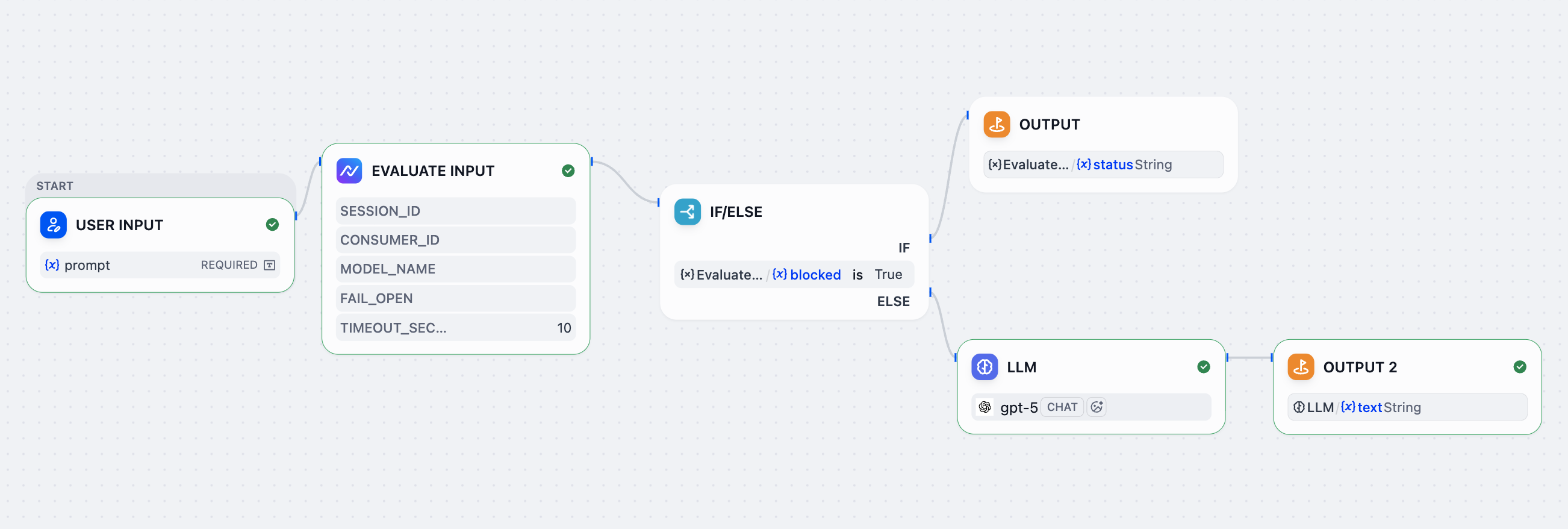
Each tool returns status, blocked, safe_text, evaluated, trace_id and findings. The blocked value is true for block, ask and any unknown verdict, and evaluated is false only when TrustGuard was unreachable and Fail Open was on. The trace_id matches the finding in TrustGuard Activity.
Inside an Agent, the verdict is visible to the model but not enforced. If an agent app needs enforcement, use the Content Moderation endpoint.
Add Dify guardrails without changing the graph
The Content Moderation endpoint adds Dify guardrails to a Chatbot, Agent or Chatflow app without editing its graph. You register the plugin's generated /moderation URL as an API Extension, then switch on Review Input Content, Review Output Content or both in the app's Features.
- On the plugin page, open Endpoints → +. Enter the TrustGuard API key, an API Extension Key (a long random string you choose), the blocked message and your fail-open preference. Copy the
/moderationURL. - In Dify, go to Settings → API Extension → Add. Paste the URL and the same API Extension Key. Dify sends a ping to verify it.
- In your app, open Features → Content Moderation, choose API Extension, and enable input review, output review or both.
According to Dify's documentation (2026), the extension answers each review with a flagged value and an action. The plugin maps block and ask to direct_output with your blocked message, and transform to overridden with the masked text. Because Dify streams output in chunks and passes no conversation ID, output detectors see partial text and turns are not grouped by session. If grouping multi-turn attacks matters, use the nodes with Session ID.
What happens when TrustGuard is unreachable
By default the plugin fails closed. If TrustGuard cannot be reached, the tool node fails and the moderation endpoint returns a blocked response. Fail Open on Unreachable is optional and lets content through only for connection errors, timeouts and HTTP 429, 502, 503 or 504 after three attempts.
| Situation | Fail closed (default) | Fail Open on Unreachable |
|---|---|---|
| Connection error, timeout, or 429/502/503/504 after 3 attempts | Tool node fails, moderation returns a blocked response | Content passes, evaluated is false |
| HTTP 401 or 403, other 4xx or 5xx, TLS errors | Fails | Fails |
Fail closed fits apps that handle customer data, and fail open fits low-risk internal tools. Test either choice by blocking the base URL in a staging app.
Security and governance: what the plugin covers and what it does not
Guardrails on prompts and responses reduce the chance that a Dify app follows an attack or leaks data, but they are one control, not the whole defense. According to the OWASP GenAI Security Project's 2026 Top 10 for LLM Applications, Prompt Injection is LLM01, Sensitive Information Disclosure is LLM02, Excessive Agency is LLM03 and Supply Chain is LLM04.
| OWASP 2026 risk | What the plugin does | What you still need |
|---|---|---|
| LLM01 Prompt Injection | Jailbreak, prompt injection and indirect injection checks, URL and document screening | Limit what the app can do if an attack gets through |
| LLM02 Sensitive Information Disclosure | PII and secret masking on input and output | Access control on the data sources the app reads |
| LLM03 Excessive Agency | Little by itself: inside an Agent the verdict is not enforced | Least-privilege tools and approval for risky actions |
| LLM04 Supply Chain | The plugin is itself a dependency of your workspace | Review and pin every plugin you install |
Treat the plugin as a dependency
According to Dify's plugin governance post (September 9, 2026), a Verified, Partner or Official label cannot replace artifact evidence, and a grade evaluates only the current version, with a rescan needed after every upgrade. According to the Marketplace listing (2026), the plugin declares one access domain, trustguard.neuraltrust.ai, and the source is public under Apache-2.0, so your team can review it and pin the version it approves.
How NeuralTrust addresses these risks
NeuralTrust, a Barcelona-based AI agent security company, groups its products under the Runtime Security Mesh platform. TrustGuard applies the runtime policy described above. AI Red Teaming (TrustTest) can test that policy against jailbreak and prompt injection attempts before you move from Observe to Enforce. The Agent Gateway (TrustGate) controls which models, MCP servers and tools an agent can reach, which covers the access side of LLM03 that a text check cannot. The Agent Runtime Security page describes the wider runtime layer.
Which Dify guardrail setup should you choose?
Choose the nodes when you build or edit Workflow and Chatflow apps and want branches, masked text and per-conversation grouping. Choose the Content Moderation endpoint when the app is already live, when it is an Agent app that needs enforcement, or when you do not want to touch the graph.
| Your situation | Use | Why |
|---|---|---|
| Building a Workflow or Chatflow with custom blocked answers or masked text | Evaluate nodes | Branching on blocked and safe_text |
| Live Chatbot, Agent or Chatflow you do not want to rewire | Content Moderation endpoint | No graph changes |
| Agent app where the verdict must be enforced | Content Moderation endpoint | Tool verdicts inside an Agent are not enforced |
| Grouping multi-turn attacks by conversation | Evaluate nodes with Session ID | Moderation extensions receive no conversation ID |
How we verified the details in this guide
We checked every detail on November 26, 2026 against the sources listed below. The plugin is version 0.1.0, so behavior may change, and this guide reports no detection rates because the listing publishes none.
Conclusion
Dify guardrails no longer need custom middleware. TrustGuard puts prompt and response checks inside the workflow or behind the Content Moderation setting, and its default is to block when it cannot reach a verdict. Pick one app, install the plugin, set the policy to Observe mode, and read the Activity log on real traffic before you switch to Enforce.
Secure Dify Apps and AI Agents in Production with NeuralTrust
Book a demo to see how TrustGuard policies, red teaming and the Agent Gateway fit your Dify setup.
Related Reading
- AI Gateway vs. AI Guardrails: Understanding the Key Differences
- Zero-Trust Security for Generative AI
FAQs about Dify guardrails
1. What are Dify guardrails?
Dify guardrails are checks that run on what users send to an app and on what the model answers. Dify has a built-in Content Moderation feature with input and output review switches, and it supports API Extensions, which let an external service such as TrustGuard return a verdict for each request.
2. How do I add content moderation to a Dify app?
Open the app's Features, choose Content Moderation, select API Extension, and enable input review, output review or both. You first register an endpoint under Settings → API Extension. With TrustGuard, the plugin generates the /moderation URL, and Dify pings it to verify when you add it.
3. Does the TrustGuard plugin work with Dify Agents and Chatbots?
Yes, through the Content Moderation endpoint, which covers Chatbot, Agent and Chatflow apps. The Evaluate tools also work in Agents, but there the verdict is visible to the model and not enforced, so use the endpoint when you need enforcement.
4. What happens if TrustGuard is down?
The plugin fails closed by default. The tool node fails and the moderation endpoint returns a blocked response. With Fail Open on Unreachable enabled, content passes only for connection errors, timeouts and HTTP 429, 502, 503 or 504 after three attempts. Authentication, other HTTP and TLS errors always fail.
5. What do I need to use TrustGuard in Dify?
You need a NeuralTrust account with TrustGuard, an Application REST API collector, the collector's tgk_ API key and an assigned policy. Dify also needs network egress to the base URL, which defaults to https://trustguard.neuraltrust.ai.
6. Can TrustGuard mask PII in a Dify app?
Yes. When the policy returns a transform verdict, the node returns the masked text in safe_text, and the Content Moderation endpoint overrides the query, inputs or output with the masked version. PII and secret masking is one of the checks a TrustGuard policy can include.
About the Author
Roger Howroyd is Head of Global SEO and AI at NeuralTrust, where he leads the company's search strategy across SEO, AEO, GEO, and LLM optimization. He specializes in AI-powered search, content strategy, and SEM. Connect on LinkedIn.
NeuralTrust is the leading platform for securing and scaling AI agents. Named a Pioneer in the Gartner Emerging Market Quadrant for AI Application Security 2026, recognized across Gartner Hype Cycle reports in 2026, and featured in the Gartner Market Guide for Guardian Agents 2026, the Gartner Market Guide for AI Gateways 2025 and the KuppingerCole Leadership Compass for Generative AI Defense 2025. Headquartered in Barcelona with offices in London and New York. ISO 27001 certified.
Sources
All sources checked November 26, 2026.
- Dify Marketplace, NeuralTrust TrustGuard, plugin listing, version 0.1.0.
- NeuralTrust, dify-plugin-trustguard, README and source, GitHub, version 0.1.0.
- Dify, Sensitive Content Moderation, documentation.
- Dify, Trust Is a Feature: How Dify Is Governing a Growing Plugin Ecosystem, September 9, 2026.
- OWASP GenAI Security Project, 2026 Top 10 Critical Security Risks for LLM Applications.
- LangGenius, langgenius/dify, GitHub repository.