Last updated: November 26, 2026
What is MCP Code Mode? It lets an agent write a short program that calls its tools, instead of calling them one at a time and reading every result. Agent Gateway (TrustGate) from NeuralTrust runs that program next to the tools, checks every call, and sends back only the answer.
Agents that use tools one call at a time pay for every step twice. This article explains how Code Mode works in the TrustGate MCP Gateway, what it saves on real workloads, and which security controls stay in force.
TL;DR: Key Takeaways
- One program, one answer: a question over 54 started issues takes 55 tool calls and about 32,000 tokens of tool output when made one at a time, and one program call that returns 21 bytes (NeuralTrust docs).
- Measured on our workspace: four programs kept between about 17,000 and 419,000 tokens each out of the model's context and returned between 253 and 777 bytes.
- Cost on Claude: a weekly digest of 1,090 issues is about 419,000 tokens, roughly $1.68 as a first-turn read on Claude Opus 5.5 at $4 per million input tokens (Anthropic pricing).
- Claude Code does not catch this: it saves MCP results over 25,000 tokens to a file, but 49 small results never reach that limit (Claude Code docs).
- Same checks: every call inside a program passes the same access, consent, policy and rate-limit checks as a direct call, and a program is capped at 30 seconds and 50 calls (NeuralTrust docs).
- Not a new idea: Anthropic's engineering team describes code execution with MCP as a way to handle more tools with fewer tokens (Anthropic).
At a glance: one call at a time versus one program
The example is a question over 54 started issues, with an issue list of about 44 KB and about 1.5 KB of comments per issue.
| One call at a time | One program | |
|---|---|---|
| Tool calls the model makes | 55 | 1 |
| Tool output the model reads | ~125 KB, about 32,000 tokens | 21 bytes |
| Who counts the comments | The model, reading 54 lists | The program |
| Calls in flight at once | As the client allows | Up to 4, inside the gateway |
The hidden cost of one call at a time
Calling tools one at a time makes the model pay twice for every step: once in a round trip, and again by reading the whole result into its context. For a task with many steps, such as counting empty comment lists across 54 issues, that adds up to tens of thousands of tokens and a long chain of turns.
Take a simple question: which of my started issues has nobody commented on yet? Over MCP, the agent lists the issues, then fetches the comments of each one, call after call. Every result lands in the model's context, so the model reads every comment on every issue just to count them.
Code Mode gives the model a better move. It writes those steps as a few lines of JavaScript, and TrustGate runs them:
What comes back to the model is ["ENG-103","ENG-106"]. The 55 tool calls still happen, inside the gateway. The model takes one turn and reads 21 bytes.
Tool calling was designed for one step at a time: the model picks a tool, reads the result, picks the next. That is fine for one lookup. For a task of many steps, it costs three things:
- Context. Every intermediate result passes through the model, whether it matters or not. What enters a conversation is sent again on every later turn.
- Round trips. Without a program, each result goes back to the model before the next call, so latency grows with the number of steps.
- Accuracy. Counting, filtering and joining by reading is where models slip. A model that reads 54 comment lists to count the empty ones can miss one. A loop does not.
The answer in the example is small because the question asks only for issue keys, so the program returns two of them. A question that asks for counts or a summary gets a longer answer, still a small fraction of what the program read, as the measured tasks below show. Your servers will return more or less than 125 KB, which is why the gateway measures every program.
Why MCP Code Mode belongs in the gateway
Running Code Mode in the gateway means every client and agent gets it without changes, one program can span several servers, and every call stays under the same checks. TrustGate already sits between agents and every MCP server a team uses, so it can run the program, apply policy per call and measure the result.
Anthropic describes the underlying idea in its post on code execution with MCP: agents write code to interact with MCP servers, which lets them handle more tools while using fewer tokens. Code execution can run in the agent's own environment. Running it in the gateway adds four things:
- It works with the clients you have and the agents you build. Claude, ChatGPT, Cursor or VS Code see one more MCP tool, whose only argument is the program. Agents built on the TrustGate SDK or any MCP framework see the same tool.
- It spans servers. One program can read GitHub and Linear and join the two, because the gateway already routes to both.
- It is governed per call. Every call inside a program passes the same access checks and policies as a direct call. A program cannot reach anything the user could not.
- It is measured. The gateway sees what each program read and what it returned, so the savings come from your own traffic.
How MCP Code Mode works
The model finds tools with trustgate_search, writes a program and sends it to trustgate_execute, and the gateway runs it in a sandbox. Each tool call leaves the sandbox through the normal gateway path, and the client receives one answer: the program's return value plus the list of calls it made.
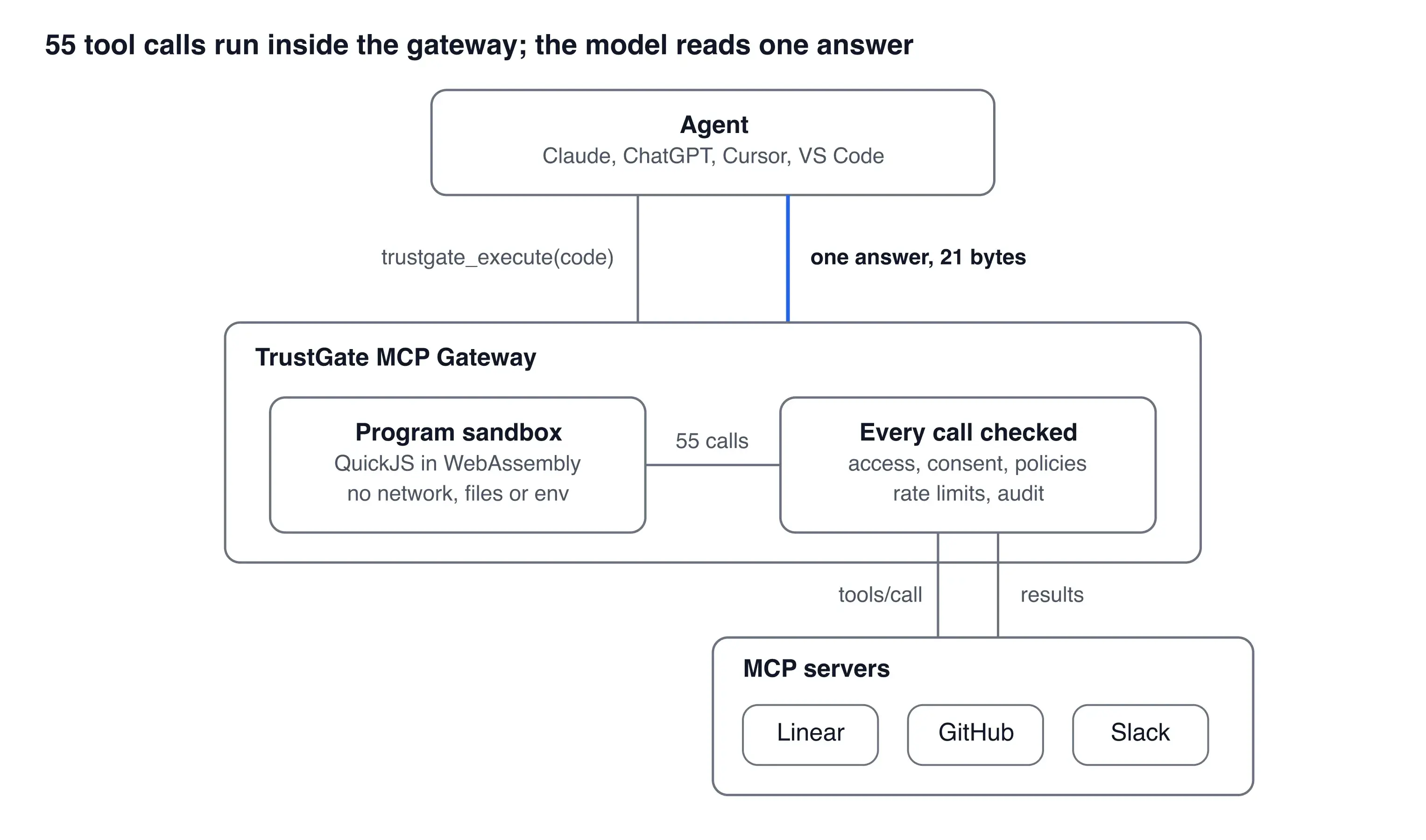
The whole surface is two tools: trustgate_search to find the user's tools, and trustgate_execute to run a program that calls them. The calls run between the sandbox and your servers, through the same checks as any direct call. Only the program's answer travels back to the model.
- The model finds the tools.
trustgate_searchanswers with the matching tools and their TypeScript-style signatures, which are the API the program will call:
- The model writes a program. It calls
trustgate_executewith one argument,code: the body of an async JavaScript function. It canawaitcalls, run them together withPromise.all, catch a failed call, log, andreturnthe answer. - The gateway runs it. The program runs in a sandbox inside TrustGate: QuickJS compiled to WebAssembly, with no network, no file system, no environment and no timers. Each
tools.<name>(…)call leaves the sandbox and takes the same path as a direct call from the client. - One answer comes back. The client gets the return value, plus the list of calls the program made, each with its server, outcome and duration. If the program fails, the answer says why and which calls ran, and the model fixes it in its next turn.
According to the NeuralTrust Code Mode documentation, programs are bounded, and every limit fails with a message that tells the model what to change, such as "pick the fields you need, slice, count or summarize in the program":
| Limit | Value |
|---|---|
| Run time, tool calls included | 30 seconds |
| Computation, waits on calls excluded | 5 seconds |
| Tool calls per program | 50, up to 4 at once |
| Memory | 64 MB |
| Program size | 20 KB |
| Return value | 25 KB |
Security and governance: every call is checked
A program can use only the tools, policies and rate limits that apply to the user who runs it. Every call it makes is checked like a direct call, and the program runs in an isolated sandbox with no network, file system or environment access. The gateway's controls stay in force while the number of model turns falls.
Every call a program makes passes these checks:
- Access. The application's tool restrictions and the user's access decide which tools exist for the program at all.
- Consent. A tool that needs the person's own account stops the program, and the client shows the usual connect link.
- Policies. Request and response policies run on every call, scoped to its server and tool. What the program hands back, its answer or its error and logs, passes the response policies of every server it called, because a program can combine and reshape what it read.
- Rate limits and audit. Each call counts against rate limits and appears in Activity under the program that made it.
The program itself has no way out except those calls. Each program runs in a fresh, isolated runtime that is discarded when it ends, so it cannot open a socket, read a file or see an environment variable. The gateway trusts nothing the program reports back and checks every limit again on its side. A replica runs at most 8 programs at once, and at most 2 of them from the same gateway, with a compute budget per program.
Why there is no read-only mode
Our first version had one. A read-only program could call only the tools whose MCP servers declared them read-only (readOnlyHint) and not reaching outside the user's data (openWorldHint).
It did not survive contact with real servers. Those annotations are each server's own claim, and nobody verifies them. One messaging server, for example, marks its channel reads as open-world, so a program reading channels was refused call after call. A rule built on unverified claims refuses ordinary reads and lets through whatever a server mislabels.
So we removed it and kept the controls that hold:
- To keep an application's agents from writing, restrict the application to the tools that read. A tool outside its restrictions does not exist for its programs either.
- To check what gets written, use request policies. They see each call's arguments, whether a program or the model made the call.
- To have a person confirm, rely on the client.
trustgate_executeis marked destructive, so clients that confirm such tools show the person the program before it runs.
A client's per-tool rules do not see inside a program. Allowing trustgate_execute without asking, as Claude Code's "always allow" does, allows every tool the user can call. Rules that must hold belong in the gateway, where every call passes them.
Measuring the savings
The gateway records the bytes a program's calls handed it and the bytes it returned to the client. Without the program, the model would have read the first number; with it, the model reads only the second. The console turns that difference into tokens kept out of context and round trips saved.
- Activity, per program: its tool calls, what it read and returned, and the tokens it kept out of context. For the question above: 55 tool calls · read 125 KB, returned 21 B · ~32K tokens.
- Analytics → Cost: Tokens Saved by Code Mode, for the gateway or one application.
- Analytics → MCP: Round trips saved, the tool calls programs made, less one per program.
Tokens are estimated as (bytes read - bytes returned) / 4, the usual rate for English and JSON. We present it as a floor. A direct result also carries its MCP envelope, and whatever enters a conversation is sent again on every later turn. Platform teams also get the raw bytes in each request's event, exported over OpenTelemetry.
Where Code Mode pays off
Code Mode pays off wherever a question takes a loop, a filter, a count or a join, and most when the answer needs more than one system. These are the cases teams bring to it. Each row pairs a team's question with the servers involved and what changes for the model:
| Team | The question | Servers | What changes |
|---|---|---|---|
| Engineering management | What moved this week, by status and owner? | Linear | A Monday report built from every updated issue, without the model reading any of them |
| Engineering | Which started issues has nobody commented on yet? | Linear | One model turn instead of one per issue |
| Platform and SRE | Is every service running and backed up, and what is open about it? | ClickHouse Cloud + Linear | One answer instead of a console tour and a tracker search |
| FinOps | What were our three biggest costs this month, and who is working on them? | ClickHouse Cloud + Linear | A month of billing records reduced to three lines |
| Engineering | Which open pull requests reference an issue that is already closed? | GitHub + Linear | One call per referenced issue, and only the mismatches reach the model |
| Incident management | Which issues raised in #incidents this week are still open? | Slack + Linear | The channel's messages never reach the model |
| Account teams | Which accounts renewing this quarter have an urgent ticket open? | CRM + support desk | A short list for the account owner, not every ticket |
| Product teams | What do this customer's orders, invoices and tickets say, before the agent answers them? | Your own services, through an application | One model turn per customer question instead of one per lookup |
The first four are measured on our own workspace in the next section. The others have the same shape: many calls, one short answer, every call checked by the gateway.
Real numbers from our own workspace
In four programs run on our own workspace, the model would have read between 68 KB and 1.68 MB of tool output, and instead read between 253 and 777 bytes. The tokens kept out of context ranged from about 17,000 to about 419,000 per program.
We ran the four programs through a TrustGate gateway against our own Linear workspace and ClickHouse Cloud organization, and recorded what each one read and returned. Two of them cross servers. Tokens are estimated with the formula above.
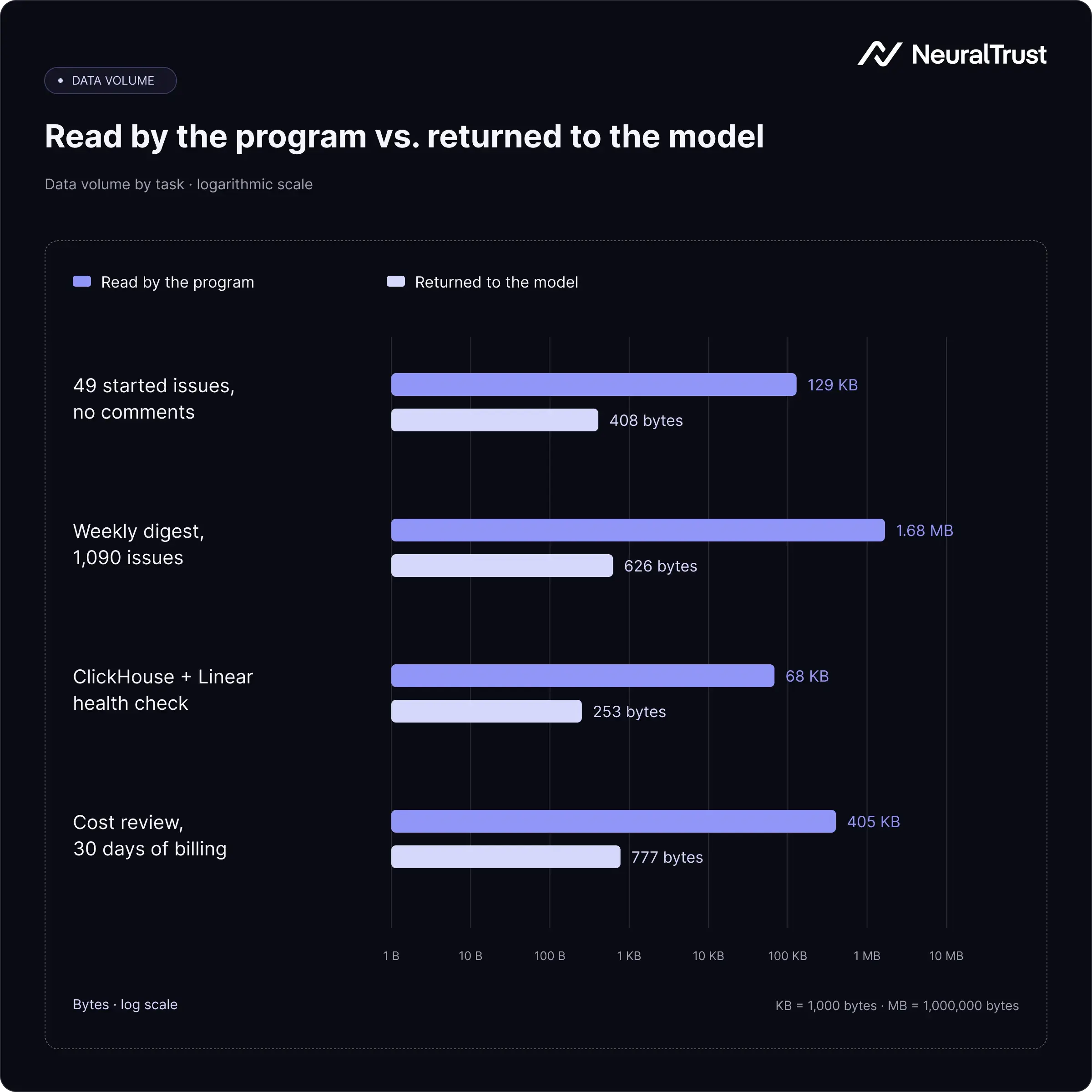
| Task | Servers | Tool calls | Read by the program | Returned to the model | Tokens kept out of context |
|---|---|---|---|---|---|
| Which of our 49 started issues have no comments yet? | Linear | 50 | 129 KB | 408 bytes | ~32,000 |
| Weekly digest: the 1,090 issues updated in the last 7 days, counted by status and assignee | Linear | 5 | 1.68 MB | 626 bytes | ~419,000 |
| Health check: each ClickHouse service's state and last backup, with the Linear issues that mention it | ClickHouse + Linear | 8 | 68 KB | 253 bytes | ~17,000 |
| Cost review: 30 days of ClickHouse billing (837 daily records, 13 billed entities), the three most expensive, and their Linear issues | ClickHouse + Linear | 5 | 405 KB | 777 bytes | ~101,000 |
The first row is the question from the introduction, at real size. The second is the report a manager asks for on Monday morning: five calls read 1.68 MB of issue data, reduced to two small tables of counts.
The cross-server rows are work a person would otherwise do by hand: open the cloud console, copy names, search the tracker. Called one tool at a time, the model would carry 405 KB of billing records in its context just to find three names. The program reads them inside the gateway, joins them with Linear, and hands back three lines. In Activity, that request shows both servers as its provider.
What that saves on Claude
Claude Opus 5.5 and Claude Sonnet 5.5 have a 1M-token context window, according to Anthropic's pricing page. Read call by call, the weekly digest alone would fill about 42% of it. The program's answer takes about 160 tokens. For a wider view of the model, see our Claude Opus 5.5 enterprise guide.
| Weekly digest, as input tokens | Claude Opus 5.5 | Claude Sonnet 5.5 |
|---|---|---|
| Read by the model, first turn (~419,000 tokens) | ~$1.68 | ~$0.84 |
| Sent again on every later turn, from the prompt cache | ~$0.08 | ~$0.04 |
| With Code Mode (626 bytes) | under $0.001 | under $0.001 |
Prices are Anthropic's list prices: input at $4 and $2 per million tokens, cache hits at $0.20 and $0.10 (pricing, checked November 26, 2026). On a Claude plan you do not pay per token, but the digest would still take up the conversation's context window.
The estimate errs low. Anthropic's pricing page gives about 2,500 tokens for a 10 kB web page, the same 4 bytes per token we use. It also notes that Claude 4.7 and later models use a tokenizer that produces about 30% more tokens for the same text.
What it changes in Claude Code
Claude Code sessions can run long, and every result stays in the conversation, so the savings add up over turns. According to the Claude Code docs, it writes any MCP result over 25,000 tokens or 50,000 characters to a file by default and leaves only the path in the conversation (Claude Code docs). That guard does not help with the two shapes that cost the most.
| In Claude Code | Triage: 49 issues and their comments | Weekly digest: 1,090 issues |
|---|---|---|
| Without Code Mode | 50 small results, each under the limit, all read into the conversation: ~32,000 tokens | 5 large results written to files: 1.68 MB on disk, read back or scripted over to count anything |
| With Code Mode | 1 call, 408 bytes | 1 call, 626 bytes, nothing written to disk |
- Many small results add up. A loop over 49 issues never trips the file limit, so every comment list lands in the conversation. Code Mode replaces them with one short answer.
- What enters stays. Claude Code sends the conversation again on every turn. Over the next 50 turns, the triage results alone add about 1.6 million cached input tokens, roughly $0.32 on Claude Opus 5.5, and bring the session closer to compaction.
- Big results become a question the agent can ask. Instead of saving 1.68 MB to the developer's machine and paging back through it, the agent asks one question and gets the counts.
- Fewer turns. One program call replaces up to 50 tool calls, so the answer arrives in the first turn instead of after the loop.
The raw results never leave the gateway, so company data stays under its policies and audit instead of piling up in local files. Claude Code already keeps MCP tool definitions out of the context until they are needed, with tool search. Code Mode does the same for tool results.
Code Mode in the agents you build
Applications that reach their tools through the gateway get Code Mode with no change to their code. A framework lists trustgate_execute like any other tool, and an agent built with the TrustGate SDK receives it through connect() and toolkit(). Analytics then shows the tokens saved per application.
- Through any MCP framework. The OpenAI Agents SDK and other MCP clients list
trustgate_executelike any other tool. Give the framework a timeout longer than the program's: according to the OpenAI Agents SDK docs, it waits 5 seconds for an MCP call unless you set a longer limit, and a program can run for 30. From version 0.5.0, the TrustGate SDK waits at least 60 seconds for a program. - Through the TrustGate SDK. In Python or TypeScript,
connect()returns the application's tool set after checking that the tools it needs are there, andtoolkit()translates every tool,trustgate_executeincluded, for a model call. - As the application, or as each user. A program has the application's tool restrictions. When the handle names an end user with
for_end_user(), every call the program makes runs as that person, and Activity shows it under them.
For an agent in a product, every turn is time a customer waits and tokens the business pays for, multiplied by every conversation. Code Mode turns a chain of lookups into one turn.
Which should you choose: one call or one program?
Use a program when a task needs a loop, a filter, a count or a join across several calls. Call the tool directly when one call answers the question, because a single call gains nothing from a program. Listing only the gateway's tools steers models toward programs, but adds a search step before a single call.
| Situation | Better choice | Why |
|---|---|---|
| Look up one record | Direct call | One call, no program to write |
| Loop over many results, then count or filter | Program | The loop runs on the gateway and the model reads only the answer |
| Join data from two servers | Program | One program can call both, and every call is checked |
| Write in bulk after a check | Program, with limits | A program can write: restrict the application to the tools it needs, add request policies, and let the client show the program before it runs |
| A rule that must hold for one tool | Gateway restrictions and policies | A client's per-tool rules do not see inside a program |
Get started in three steps
Code Mode is available today in the TrustGate MCP Gateway. Turn it on in the console, optionally list only the gateway's tools, and reconnect your MCP client. Only admins can change the setting, and the agents themselves need no code changes.
- In the console, open Settings → Agent Gateway → General → MCP Code Mode, choose On and save.
- Optionally, set Tool listing to Gateway tools only. The model then finds tools through
trustgate_searchand reaches for programs more often. - Reconnect your MCP client, ask a question that takes a few steps, and open the request in Activity to see what the program read and returned.
Claude's hosted connectors keep the tool list they fetched when the person connected, so people see trustgate_execute once they reconnect. Agents built on the TrustGate SDK or an MCP framework find it the next time they list their tools. The Code Mode documentation covers the program API, the limits, worked examples and troubleshooting.
Conclusion
MCP Code Mode turns a chain of tool calls into one program that runs next to the tools. In the four programs we measured, the model read between 253 and 777 bytes instead of between 68 KB and 1.68 MB, and every call stayed under the gateway's access checks, policies and rate limits. Use a program when a task needs a loop, a filter or a join, call the tool directly when one call is enough, and let Analytics show what your own traffic saves.
Secure MCP Tool Calls in Production with NeuralTrust
Turn on Code Mode for one gateway this week and let the numbers in Analytics show how much it saves, with every call still checked by TrustGate.
Related Reading
- MCP Security Best Practices: A 2026 Checklist for Servers and Clients
- AI Gateway for Agentic AI: Securing Multi-Agent Workflows
- Claude Code MCP and Cursor MCP Security
FAQs about MCP Code Mode
1. What is MCP Code Mode?
MCP Code Mode lets an agent write a short JavaScript program that calls its MCP tools, instead of calling them one at a time. The gateway runs the program next to the tools, checks every call and returns only the program's answer, so the model reads far less tool output.
2. How does MCP Code Mode reduce token usage?
The model no longer reads every intermediate result. The program reads them inside the gateway and returns only what the question needs. In the four programs measured on our workspace, the model read between 253 and 777 bytes instead of between 68 KB and 1.68 MB, which kept about 17,000 to 419,000 tokens out of context.
3. Is it safe to let an agent run code through a gateway?
The program runs in an isolated sandbox with no network, file system or environment access, and its only way out is a call to the user's tools. Each call passes the same access checks, consent, policies and rate limits as a direct call, and the gateway checks every limit again on its side.
4. Which clients and agents work with Code Mode?
Any MCP client sees trustgate_execute as one more tool, and agents built on the TrustGate SDK or an MCP framework receive it too. Claude's hosted connectors keep the tool list they fetched, so people see the new tool after they reconnect. Nothing changes in the agent's own code.
5. When should I not use Code Mode?
Skip it for a single lookup. A single call gains nothing from a program, so call the tool directly. Listing only the gateway's tools also adds a search step before a single call, so keep your own tools listed if most tasks are one call.
6. What are the limits of a program?
A program can run for 30 seconds, with 5 seconds of computation, and make up to 50 tool calls, 4 at a time. It has 64 MB of memory, a 20 KB program size and a 25 KB return value. Each limit fails with a message that tells the model what to change.
7. Can a program write data, or only read it?
A program can call tools that write. There is no read-only mode, because server annotations such as readOnlyHint are unverified claims. To keep agents from writing, restrict the application to read tools. To check what gets written, use request policies, which see every call's arguments.
8. How do I turn on MCP Code Mode in TrustGate?
An admin opens Settings → Agent Gateway → General → MCP Code Mode, chooses On and saves. The same setting is available through the Admin API with mcp_code_mode. People then reconnect their MCP client to see trustgate_execute, and Activity shows what each program read and returned.
Sources
All sources checked November 26, 2026.
- NeuralTrust, Code Mode, TrustGate documentation.
- NeuralTrust, Tools, TrustGate SDK documentation.
- NeuralTrust, TrustGate, open-source repository, including the QuickJS WebAssembly runtime.
- Anthropic, Code execution with MCP: building more efficient agents, engineering blog.
- Anthropic, Pricing, Claude Platform documentation.
- Anthropic, Connect Claude Code to tools via MCP, Claude Code documentation.
- OpenAI, Model context protocol (MCP), OpenAI Agents SDK documentation.
- Measurements: NeuralTrust engineering, programs run on NeuralTrust's own Linear workspace and ClickHouse Cloud organization.